Free pack
Free today
Safe-zone PNGs for any editor.
- Reels, TikTok and Shorts safe zones
- 1080×1920, organic
- Works in any editor
Plug-in for Adobe Premiere Pro
Safe-zone guides for Instagram Reels · TikTok · YouTube Shorts · Stories + 5 more apps
One click puts the app’s safe zone on your Premiere timeline, sized to your sequence. Nine apps, organic and ads, up to 4K.
Built by video editors, for video editors.

REELS · ORGANIC
Measured on a real phone
Reels, Shorts and Stories interfaces traced from iPhone screenshots, not guessed from templates.
Every zone sourced and dated
Each number says where it comes from and when it was last checked. See them all
Hidden guide, identical export
Tested in Premiere: frame for frame the same as a timeline that never had a guide.
00:00:08:12 · CLIENT
Every client says it. Usually right before the approval call. Sometimes right after the post goes live.
It’s a fair question, and it’s harder to answer than it sounds. The apps move their buttons, their captions and their ad bars without telling anyone. The template on the shared drive was right in spring and wrong by summer, and you still answer with “I think so.”
Super Guides answers it in one frame.
Looks great. Just make sure it’s inside the margins.
It is. Here’s the frame.
Client_Spot_v3_Reels_00-00-12-04.jpg
Perfect, approved.
TRY IT · LIVE
Pick an app, move the title, switch the guide off. Same measurements as the plug-in, running in your browser.
Drag the title.
SOURCES · DATED
Most apps publish no safe zones for organic posts. Most templates online are a best guess, copied from someone else’s best guess, and nobody tells you when they stop being right.
So every safe zone in Super Guides shows where its numbers come from, the platform’s own spec, our measurement or the community’s, and the date it was last checked. We measured the Reels, Shorts and Stories interfaces on real iPhone screenshots. TikTok comes from TikTok’s own ad template until we’ve measured it the same way.
We re-check every app at least once a quarter. Every change goes in a public changelog, and updates are free. Last full check: 23 October 2026.
9 APPS · 1 REFERENCE
Vertical 9:16, at 1080×1920 and 4K. Organic and ad placements where the app has both.
| App | What you see | Placements | Best evidence | Last checked |
|---|---|---|---|---|
| Instagram Reels | Safe zone, plus the app’s interface | organic, ads | Official (ads) | 25 October 2026 |
| Instagram Stories | Safe zone, plus the app’s interface | organic, ads | Official (ads) | 25 October 2026 |
| TikTok | Safe zone, plus the app’s interface | organic, ads | Official template (ads) | 23 October 2026 |
| YouTube Shorts | Safe zone, plus the app’s interface | organic, ads | Official (ads) | 23 October 2026 |
| Facebook Reels | Safe zone | organic, ads | Official (ads) | 25 October 2026 |
| X | Safe zone | ads | Community measurement (ads) | 23 October 2026 |
| Snapchat | Safe zone | ads, organic | Community measurement (ads) | 23 October 2026 |
| Safe zone | organic, ads | Official | 23 October 2026 | |
| Safe zone | organic, ads | Community measurement | 23 October 2026 | |
| All apps | The one area that’s safe on all nine at once | |||
MASTER · CLEAN
Premiere has no guide layer, so we won’t promise magic. You get three things instead:
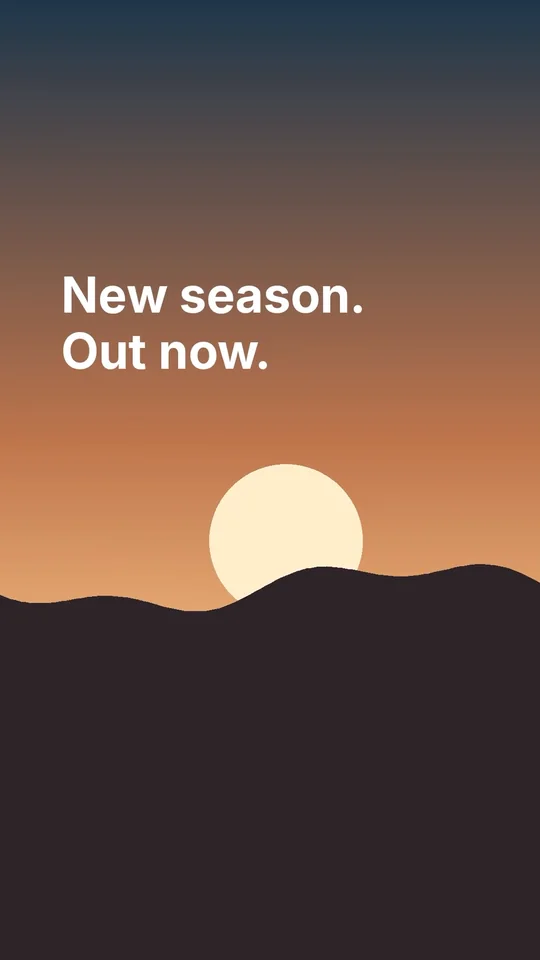
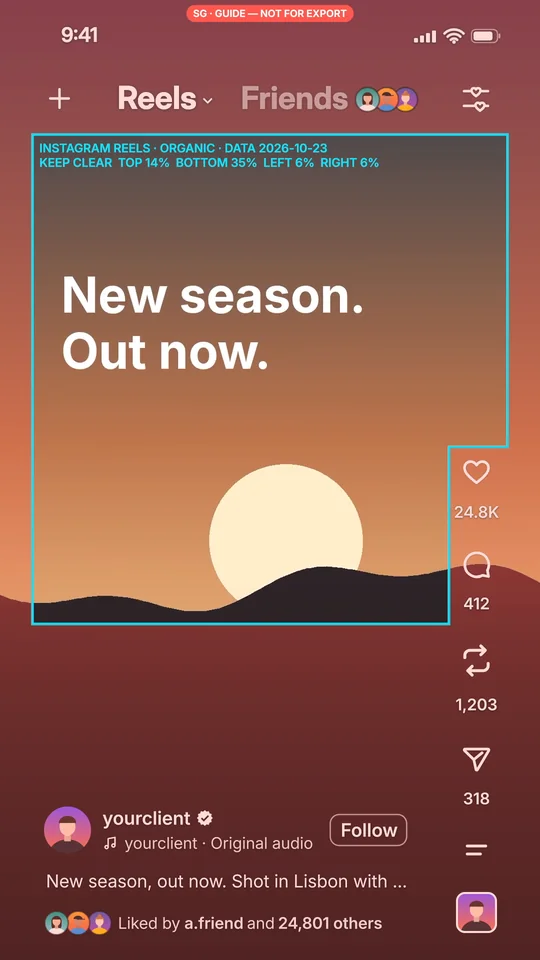
Δ 0 px · 0 of 300 frames differ
00:00:12:04 · EXPORT FRAME
Park the playhead on the shot that matters: the super, the logo, the legal line. Export the frame with the guide on. Your client sees your edit with the app on top and the safe zone around it, and exactly where their title sits.
No “trust me”. No screenshots from your phone. A frame they can forward to whoever has to sign off.
Coming as a free update: one click exports the frame with the app, the placement and the date its safe zones were last checked printed under it.
EXTRA · THE CLIENT’S POST
On Reels, Stories, TikTok and Shorts, the guide can also draw the app itself with your client in it. Drag their logo into the profile picture, type their handle and caption, set the likes, pick an ad button. Every element is a control in Premiere’s Properties panel, so there’s nothing new to learn. Switch any of them off, or go to wireframe when you only need the lines.
The post is on Reels, Stories, TikTok and Shorts. The safe zones are on all nine apps.
PRICING
One-time price, no subscription.
| Free PNG pack | Super Guides plug-in | |
|---|---|---|
| Apps | Reels, TikTok and Shorts | Nine apps, plus All apps |
| Sizes and placements | 1080×1920, organic | Up to 4K, organic and ads |
| Putting it on a sequence | Import, scale and place it, every time | One click, sized to the sequence |
| A clean master | Remember to switch it off | One click hides it, and a NOT FOR EXPORT stamp if you forget |
| When the apps change | Download the pack again | Updates included |
| Extra: your client’s post | Not included | Photo, handle, caption and numbers on Reels, Stories, TikTok and Shorts, editable in Properties |
| Works in | Any editor | Adobe Premiere |
Free today
Safe-zone PNGs for any editor.
Launch price
$19 one-time until v1.0 (12 January) · $29 after
The Premiere plug-in.
$79 available January 12
Super Guides for your team.
Q&A
The PNGs are three apps at 1080×1920 that you import, scale and place by hand. The plug-in puts any of nine apps, or All apps, on your timeline in one click, sized to the sequence, organic or ads, up to 4K. It sits on its own track, leaves the export in one click and updates when the apps change. On Reels, Stories, TikTok and Shorts it can also show your client’s post.
The free safe-zone pack: PNGs for Instagram Reels, TikTok and YouTube Shorts at 1080×1920, with every source and check date listed on this site. You also join the list, and list members hear first when the plug-in opens, at the launch price: $19 until version 1.0 (12 January), then $29.
Safe zones for Instagram Reels, Instagram Stories, TikTok, YouTube Shorts, Facebook Reels, X, Snapchat, Pinterest and LinkedIn, plus All apps, the one area that is safe on all nine at once. On Reels, Stories, TikTok and Shorts the guide also draws the app’s interface, with your client’s photo, handle and caption if you want them.
Tested on Adobe Premiere 26 on macOS. Older versions and Windows are not tested yet; this page will say so before anyone pays. If you’re on Windows, don’t buy until it says Windows here. It is built on UXP, Adobe’s current plug-in system.
Not if you hide it. One click mutes the guide track, and with it hidden the export is identical, frame for frame, to one that never had a guide. Tested in Premiere. If you forget, the NOT FOR EXPORT stamp makes it hard to miss.
Every safe zone lists its source and the date it was checked: the platform’s own spec where one exists, our own measurement, or a community measurement, labelled as such. The Reels, Shorts and Stories interfaces are drawn from real iPhone screenshots; their organic safe zones come from community measurements. TikTok comes from TikTok’s own ad template until we have measured it the same way.
We re-check every app at least once a quarter. Changes go in the public safe-zone changelog and ship as a free update.
Yes. Export the frame with the guide on and they see exactly where everything sits. On Reels, Stories, TikTok and Shorts you can put their photo, handle and caption in first. Previews are for you and your client; don’t publish them as if they were real posts.
No. Everything happens in Premiere: the panel adds the guide, and Premiere’s own Properties panel edits it.
Three, all from Premiere and After Effects: emojis show in black and white (After Effects text has no colour emoji); text in Properties applies when you press Enter or Tab; and undoing an added guide takes a few ⌘Z presses, so deleting the guide clip is quicker.
No. Super Guides is an independent tool made by video editors. It is not affiliated with, endorsed or sponsored by Adobe, Meta, TikTok, Google, Snap, Pinterest, LinkedIn or X.
14-day refund, no questions. Write to hello@superguides.pro and the Super Guides team answers.
END CARD
Get the free safe-zone pack today. List members hear first when the plug-in opens: $19 until v1.0 (12 January), then $29.